Issue 01 · Autumn 2026

One private health graph

10 apps. 10 subscriptions. Nothing connects them. HealthGraph does.

Health,
connected.

Check your pulse with your camera. Log meds, meals, sleep, and cycle. Ask your own data what it means. One graph holds it all, on your phone instead of our servers. Free to start, free to keep.

One health graphPrivate by designFree forever
SLEEPMEDSFOODPULSEMOODHealthGraph
One graph. Sixteen capabilities. No subscription.

01Register

Every signal.

Measured on your phone, joined into one graph: nights explain mornings, meals explain afternoons

01Camera PulsePulse check02Medical Documents→03Medication Schedule→04Sleep & Recovery→

Sixteen capabilities, four domains. Whatever you measure lands in the same graph — and stays there, even if you switch apps.
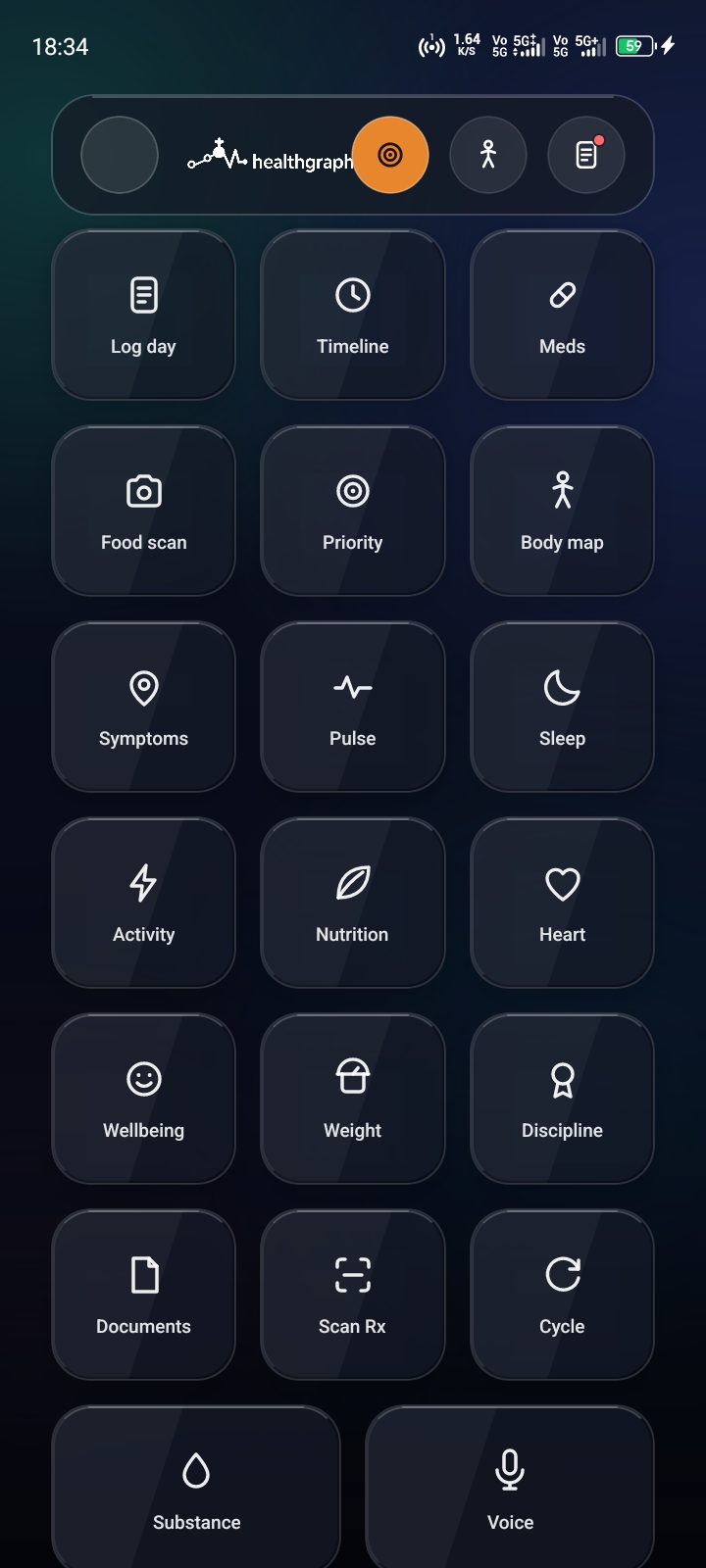
HealthGraph app: overview of all capabilities
Screenshot 01 · Every capability at a glance

02Capabilities

Everything.

Sixteen capabilities, one graph. Each one earns its place by replacing an app you pay for

Chapter 01

Measure

Four ways to take a reading — camera, face, keypad, or scan.

Chapter 02

Understand

Entries become relationships. Relationships become a next step.

Chapter 03

Manage

Plans, documents, nights, cycles — ordered and exportable.

Chapter 04

Act

One tap, and the day turns in the right direction.

03Priority engines

Seven lenses.

Seven priority engines. Each one reads what you actually logged and shows what changed — no score, no verdict.

Chapter 03

You pick your focus areas during setup, and any number of engines can run side by side. Every engine compares the last seven days against the seven before. A value you never logged stays missing: it is never quietly turned into a zero, and never into a grade.

  • Sleep

    Reads the nights you logged, with bedtime and wake time when you enter them.

    Shows how long you slept on average, one honest line about bedtime consistency, and this week against last week.

  • Weight

    Reads the weight in your profile.

    Shows that number and where it came from. No trend line from a single point — one value has no baseline, so it does not get one.

  • Discipline

    Reads check-ins, logged doses, substance entries, cycle entries and camera measurements.

    Shows how many days you logged something, your streak, and adherence — three separate lines, never blended into one score.

  • Fitness

    Reads the activity sessions you logged, with their durations.

    Shows sessions, active minutes, and the calories and distance you entered yourself.

  • Nutrition

    Reads the meals you counted and the calories a food scan estimated.

    Shows meal counts and scanned calories as they are, plus targets you set yourself. Targets are goals, never prescriptions.

  • Wellbeing

    Reads your mood, energy and stress ratings from one to five.

    Shows each rating on its own scale of five. They are never averaged into a single mood score.

  • Heart

    Reads your camera pulse and face pulse measurements, plus HRV when the capture was clean enough for it.

    Shows heart rate, HRV, and how much of it was reliable. Camera and face readings stay labelled; they are never silently merged.

04The graph

One spine.

Not a list. A typed, time-aware structure — and every path through it is written down in advance.

21 node types · 32 relationship types · 3 terminal labels

Schema · v1

Person

  • Patient
  • PatientStatement

edges leaving this layer

  • HAS_DAY
  • HAS_VISIT
  • HAS_TIMELINE_EVENT
  • HAS_OBSERVATION
  • HAS_STATEMENT
  • HAS_CONDITION
  • HAS_MEDICATION_REQUEST
  • HAS_MEDICATION_TAKEN
  • ACTIVE_MEDICATION

Time

  • Day
  • Visit
  • TimelineEvent

edges leaving this layer

  • HAS_EVENT
  • OCCURRED_DURING
  • LOGGED_ON
  • HAS_SLEEP
  • HAS_ACTIVITY
  • HAS_NUTRITION
  • HAS_FOOD_SCAN
  • HAS_ENTRY
  • HAS_BIOMETRIC
  • HAS_MEASUREMENT

Events & measurements

  • Observation
  • Measurement
  • PPGMeasurement
  • ActivityEvent
  • SleepEpisode
  • NutritionIntake
  • FoodEntry
  • FoodScan
  • MedicationTakenEvent
  • ConditionOccurrence

edges leaving this layer

  • AFFECTS
  • SOURCE_DOCUMENT
  • DOCUMENTED_IN
  • RESULTS_FROM
  • TAKEN_FROM
  • HAS_CODE
  • PRESCRIBES
  • PRESCRIBED_FOR
  • ABOUT
  • HAS_VERSION
  • SUPERSEDES
  • REASON_STATED_BY_PATIENT
  • CONTAINS

Source & reference

  • Document
  • Concept
  • Medication
  • MedicationRequest
  • MedicationVersion
  • AnatomicalStructure

Terminal

shared reference — queries end here

01 · No causal edges.

CAUSES, TREATS and NEXT are not in the vocabulary at all. The graph records what sat next to what and when — never what caused what. Any answer that says “because” is doing more than the data allows.

02 · Terminal labels.

Concept, Medication and AnatomicalStructure are shared reference data. A query may end there but never travels through them, so one patient’s graph can never be walked into another’s.

03 · Assertions, not assumptions.

A negated, hypothetical, historical or family-attributed mention stays an assertion. Only confirmed facts are allowed to become a condition you carry.

AppendixAnd the three systems that feed it.

Where the records come from before they reach the graph — and how they stay checkable.

Evidence index

Scanned documents are split into passages and indexed, so an answer can point back to the exact lines it came from.

Every claim Sanotts makes carries a citation you can open. If the text does not support the claim, the citation is dropped instead of kept.

Document extraction

Lab reports and prescriptions are read by a document model and turned into fields you can search.

A photographed lab report becomes a date, a value and a unit — searchable, instead of a PDF you scroll through.

3D anatomy

Male and female body shells are generated by this project and ship inside the app. Finer organ models download once, then work offline.

The shells need no download and no licence. Tap a zone and the graph answers with your data for it.

05The app

The app.

Three screens, one graph

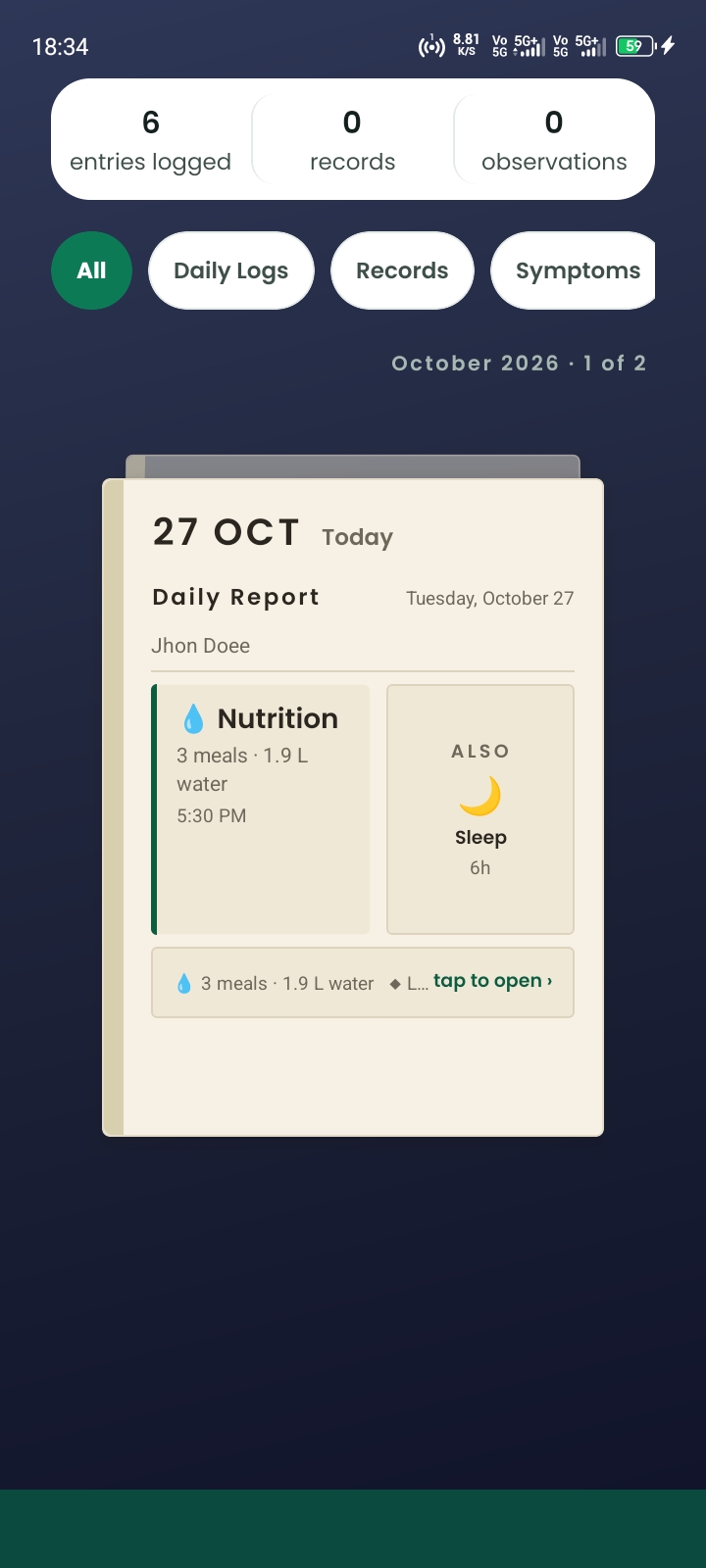
HealthGraph daily report: nutrition, sleep and the shape of the day on one card
Screenshot 02 · Daily report, October 27
01

The daily report

Nutrition, sleep and the shape of the day sit on one card — a single page you read in the morning and then dismiss.

02

Pulse by camera

Sixty seconds of stillness, one finger in front of the lens. Pulse and HRV, without a wearable, without the cloud.

03

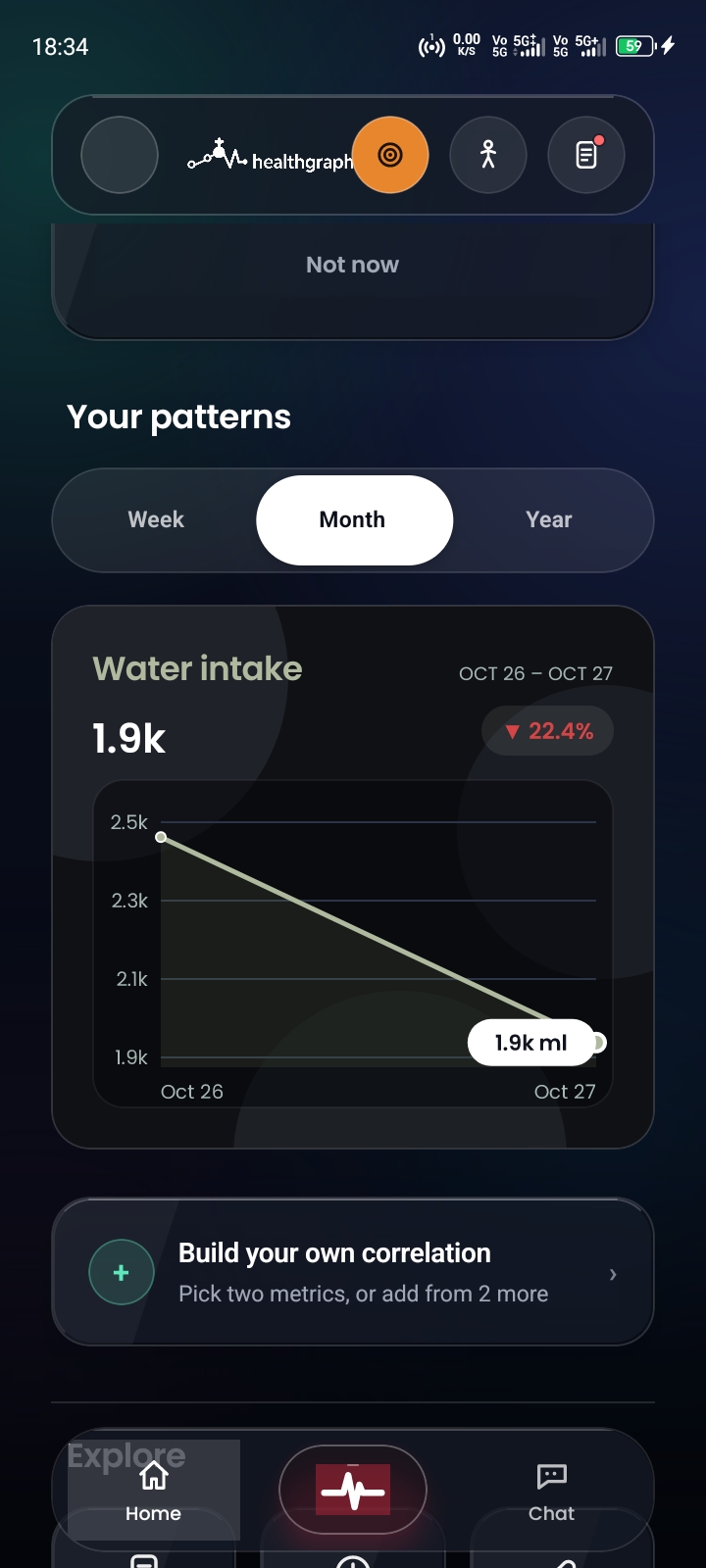
Your patterns

Weeks, months, years — plus correlations you build yourself between two metrics.
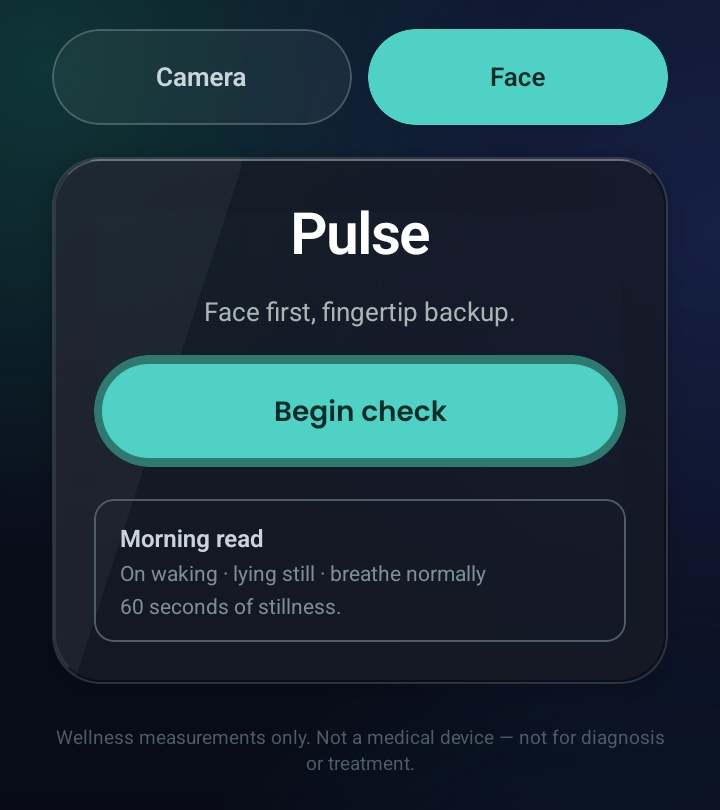
HealthGraph app: Pulse by camera
Screenshot 02 · Pulse by camera
HealthGraph app: Your patterns
Screenshot 03 · Your patterns

These screens are not mockups. Everything you see runs on your device — the app is the graph, and the graph is the app.

06Comparison

The graveyard.

Count the health apps on your phone. Then count the subscriptions.

10

Apps in the graveyard

  • 01Sleep tracker
  • 02Calorie counter
  • 03Medication reminder
  • 04Period tracker
  • 05Running app
  • 06Meditation app
  • 07Water reminder
  • 08Symptom checker
  • 09Document scanner
  • 10Habit tracker

Ten apps. Ten logins. Ten subscriptions. None of them knows what the others know.

1

Graph that knows it all

Sixteen capabilities. One graph. Sleep explains mornings, meals explain afternoons, meds explain the flat weeks, because for the first time, everything is in the same place.

$48.93 a month for chaos. HealthGraph: sixteen capabilities, one graph, €0 to start.

Get early access

07A day

A day with it.

Not a dashboard you admire. A rhythm you barely notice.

07:12

Your alarm speaks. You answer half-asleep: slept badly, shoulder aches. Logged before your feet touch the floor.

08:05

Breakfast barcode, one scan. Oats, again. Your phone remembers the product. No signal needed, no typing.

13:40

The midday dose was due at 13:00. One tap notifies your sister, straight from your phone. She texts back: proud of you.

19:22

Finger on the camera, sixty seconds. Heart rate, HRV, done, while the pasta water boils.

22:47

The graph shows it plainly: short nights cluster before heavy days. Tomorrow you protect the evening. That is the whole trick.

Five moments. Not one of them feels like data entry.

08How it works

How it works.

Three moves. Sixty seconds at a time.

Step 01

Measure

Pulse, meals, meds, sleep, symptoms, captured by camera, barcode, voice, or a ten-second tap. Whatever costs you the least effort wins.

Step 02

Connect

Everything lands in one graph. Nights explain mornings, meals explain afternoons, meds explain the flat weeks. Correlations surface on their own.

Step 03

Act

Seven priority engines turn patterns into what changed, so the next move is yours to pick. Refill before you run out. Protect the evening. Call your sister. Small moves, compounded.

09Privacy

Private.

Device-first by design. Your data never has to leave your hand to be useful

On device

Camera pulse, face pulse, and the health graph itself live on your phone. The cloud is a backup you control, not a business model.

Encrypted

Cached files are encrypted at rest and wiped the moment you log out. Lose your phone and your health history does not go with it.

GDPR aware

DSGVO-compliant, export and deletion in one tap. Your health data is never sold. We would have to have it first, and we do not.

Yours to take

Full export in open formats, full deletion with no dark patterns. Leaving is easy, which is exactly why you will not want to.

The principle

Selling health data would be a business model that owns data. We own none.

10Film

Watch.

The story in sixty seconds: why ten apps became one graph

Video follows · Coming soon

Declare health independence

Your health data belongs to you. 10 apps. 10 subscriptions. One app breaks you free.

Video follows · Coming soon

The tax on your health

$48.93/month for chaos. HealthGraph: 10 features, one graph, $0 forever.

AAppendix · Pricing

Pricing.

Start free and stay free as long as you like. Upgrade only when the advanced lenses earn it.

Free

€0 forever

  • Daily logging & check-ins
  • Medications & dose tracking
  • Timeline & history
  • Priority engines
  • 3 meal scans a month
  • 2 AI messages a month
AI messages
2 / month
Food scans
3 / month
Document scans
none
Start free

General

Recommended

€11 /mo

  • Everything in Free
  • Trends & correlations
  • Camera pulse (PPG)
  • Caregiver PDF report
  • Prescription scanner
  • 4 document scans a month
  • Unlimited food scans
AI messages
50 / month
Food scans
unlimited
Document scans
4 / month
Choose General

All-in

€18 /mo

  • Everything in General
  • Face pulse (rPPG)
  • 3D body included
  • Voice alarms & call reminders
  • Unlimited AI chat
  • Unlimited document scans
AI messages
unlimited
Food scans
unlimited
Document scans
unlimited
Choose All-in

BAppendix · The team

Two builders.

We're two independent builders brought together by a shared interest in AI, healthcare, design, and everyday technology that means something.
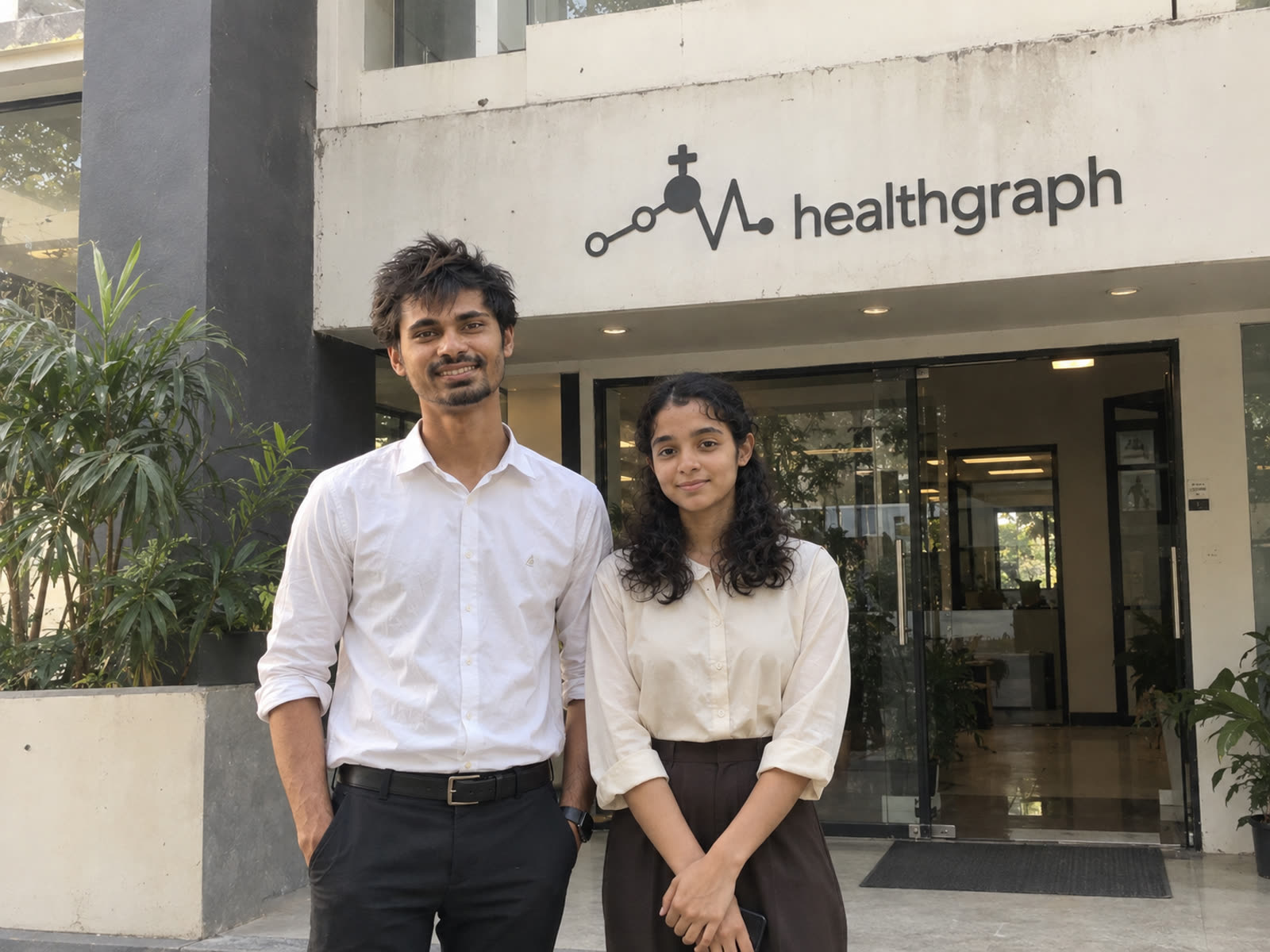
The two builders behind HealthGraph
The two makers in front of the HealthGraph house

One of us works with AI, software, healthcare systems, and knowledge graphs. The other shapes how technology feels to the people using it. Neither of us comes from healthcare, and we don't claim to be medical professionals. We saw a problem worth exploring, so we learned, experimented, and built our way toward a possible solution. HealthGraph grew from that journey.


Health information is everywhere, but rarely connected. Reports live in one place, prescriptions in another, and fitness, sleep, and food each in an app of their own.

Your health isn't fragmented. Your records are.

We don't believe the future of digital health is ten apps for ten parts of your life. It's one connected experience: records, medications, measurements, daily habits, and your history, joined into a clearer picture over time.

Not another app for the collection. One place where your health comes together.

“Your health is a connected story. Your technology should understand it that way.”

CAppendix · Answers

Answers.

100 questions people ask before they switch. Each one lands here, answered from the app itself.

  1. How can I measure heart rate with my phone camera and no watch?Put your fingertip on the lens for 60 seconds. HealthGraph reads tiny skin-color shifts (PPG) on-device and gives heart rate plus HRV. No watch, no strap. See #capabilities. See #capabilities.
  2. Can a selfie video really measure my pulse?Yes. Prop the phone up, look at it for about 30 seconds. The face-pulse lens reads the same skin-color signal from your face, on-device, frames never stored. See #capabilities. See #capabilities.
  3. How do I build a personal HRV baseline?Take morning and evening readings for a few weeks. HealthGraph trends them so the readiness lens learns what is normal for you. See #capabilities. See #capabilities.
  4. Is phone PPG the same idea hospitals use?The same photoplethysmography principle, minus the finger clip. Phone readings are wellness trends, not medical measurements. See #faq. See #faq.
  5. Does pulse check work offline?Yes. Camera and face pulse compute on your phone, and the 3D body ships inside the app, so airplane mode still works. See #capabilities. See #capabilities.
  6. When should I take a pulse reading?Most people do morning and evening: morning shows recovery, evening while dinner cooks shows the day. The Day rhythm uses 19:22 for the 60-second check. See #app. See #app.
  7. Why do my pulse readings fail when my hands shake?Motion breaks the skin-color signal. Rest the phone on a table, hold still, use good light. Failed quality reads are discarded, never filed as fact. See #faq. See #faq.
  8. How do I watch resting pulse drop across a training block?Log readings daily, then scroll Trends & timeline for months. You will see the drift across the block instead of one noisy day. See #capabilities. See #capabilities.
  9. Can I get HRV without a subscription wearable?Yes. Fingertip on the lens gives heart rate plus HRV with no watch and no subscription. The phone in your pocket is the wearable. See #capabilities. See #capabilities.
  10. Are my face-pulse video frames stored anywhere?No. Every frame is analyzed on your device and never stored. Your face never uploads anywhere. See #capabilities. See #capabilities.
  11. Can my older parent use pulse check with no tech skills?Yes. One 60-second fingertip hold, or a 30-second look at the phone. No pairing, no charging, no wearable. See #how. See #how.
  12. What pulse history should I show my doctor?Show the 7-day trend and morning/evening notes from your timeline. It is a clearer mirror for the visit, not a diagnosis. See #capabilities. See #capabilities.
  13. Does camera pulse need good light?Fingertip needs the flash-lit lens seal; face pulse needs decent front light. The quality meter tells you live whether the signal counts. See #capabilities. See #capabilities.
  14. Phone pulse vs smartwatch: which should I use?Wearables are welcome guests, never requirements. If you own one, keep it; if not, the camera covers heart rate and HRV for free. See #faq. See #faq.
  15. Where do my pulse readings live?On your phone first, in your health graph. The cloud is only a backup you control. Export or delete any time. See #why. See #why.
  16. How do I log sleep in under ten seconds?Bedtime, wake time, naps, quality notes: four quick taps. The engine pairs nights with next-day energy until your formula appears. See #capabilities. See #capabilities.
  17. Why am I tired? Can my own data answer?Ask Sanotts AI in plain words. It answers from your logs with receipts, e.g. your last five short nights, and says so when data is missing. See #capabilities. See #capabilities.
  18. Which bedtime actually buys me a good morning?The sleep engine pairs your nights with energy until your personal formula appears, instead of generic 8-hour advice. See #capabilities. See #capabilities.
  19. Should I log naps or only nights?Log both. Nights, naps, bedtimes and wake times all feed recovery, so short nights plus naps tell the full story. See #capabilities. See #capabilities.
  20. Do short nights cluster before heavy days?The graph shows it plainly: short nights cluster before heavy days, so tomorrow you protect the evening. That is the whole trick. See #app. See #app.
  21. Can I track sleep with no wearable?Yes. Manual bed/wake logging plus next-day energy is enough for the sleep lens. No ring or watch required. See #faq. See #faq.
  22. How far back can I scroll my sleep?Months. Trends & timeline is longitudinal, so habits compound visibly or you spot the week everything slipped. See #capabilities. See #capabilities.
  23. Which evenings buy good mornings?The app pairs each evening with the next morning until the pattern is obvious. See which evenings pay and which charge interest. See #capabilities. See #capabilities.
  24. Does my sleep explain my mornings?That is the core join: nights explain mornings, meals explain afternoons. Everything sits side by side for the first time. See #why. See #why.
  25. What sleep notes are worth writing?Bedtime, wake time, quality, plus one line on the evening. Sixty seconds at 22:47 beats a perfect diary you quit. See #app. See #app.
  26. How do I set up a medication schedule?Define each medicine once with dose, times and days. The day view reduces to one decision per row: taken or not. See #capabilities. See #capabilities.
  27. What happens when I miss a linked dose?You tap once and your SMS app opens with the message ready for the family member you invited. Nothing is ever sent automatically. See #faq. See #faq.
  28. How do refill-aware reminders work?The app counts your supply down and reminds before you run out, so refills stop being surprises. See #capabilities. See #capabilities.
  29. Can I snooze a med reminder with a reason?Yes. Snooze with a reason and the graph learns the difference between forgot and chose. See #capabilities. See #capabilities.
  30. How do people remember the midday dose at work?A spoken alarm asks, you answer taken, it logs with a timestamp. No unlocking, no typing, no I will log it later. See #app. See #app.
  31. Which medications should family watch?Pick only the doses that matter most, invite someone you trust, and choose which meds they see. Your tap is consent every time. See #faq. See #faq.
  32. Can missed meds explain flat weeks?Yes. Meds explain the flat weeks because everything is in the same place: doses sit next to sleep, meals and mood. See #why. See #why.
  33. How do I show my medication adherence to my doctor?Every taken dose lands timestamped in the graph. Export the timeline in open formats in seconds, ready for the visit. See #capabilities. See #capabilities.
  34. How do I log multiple meds a day fast?One tap per row stamps the time. Three screens, one graph, sixty seconds at a time. See #how. See #how.
  35. What does a voice medication alarm sound like?It talks and listens: Did you take the midday dose? Answer taken and it is logged. See #capabilities. See #capabilities.
  36. Is adherence really a health signal?Yes. The dose spoke joins sleep, heart, meals and mood, so skipped weeks show where they belong. See #capabilities. See #capabilities.
  37. Do med reminders work with no signal?Logging, meds and timeline work offline and sync quietly when you reconnect. Anything needing network says so. See #faq. See #faq.
  38. How does barcode scanning get macros for free?The database is Open Food Facts: free, open, two million products. First scan downloads macros; repeats work with zero bars. See #capabilities. See #capabilities.
  39. Can I scan food with no signal in the supermarket?Yes. Your most-scanned products live on your phone, so repeat scans work offline in the basement. See #capabilities. See #capabilities.
  40. How fast is breakfast logging really?Breakfast barcode, one scan. Oats, again. Your phone remembers the product. No signal needed, no typing. See #app. See #app.
  41. Do meals really explain afternoons?That is the join: meals explain afternoons the way nights explain mornings. Heavy lunch, flat afternoon, visible. See #why. See #why.
  42. Why replace my calorie counter with barcode scan?Ten apps, ten logins, ten subscriptions, none knowing the others. One scan feeds the same graph as sleep and meds. See #why. See #why.
  43. How do nutrition and weight lenses use food logs?The weight and nutrition engines watch meals plus scale entries and turn them into one clear next step, not a dashboard of dials. See #capabilities. See #capabilities.
  44. How do I log food with no barcode when eating out?Ten-second manual tap: what you ate and how you felt. Whatever costs least effort wins. See #how. See #how.
  45. Can I see what I ate three months ago?Yes. Every entry lands timestamped, scrollable for months, so the snacking-start week is findable. See #capabilities. See #capabilities.
  46. How many meal scans does Free include?Free includes 3 meal scans a month plus 2 AI messages. Daily logging, meds and timeline stay free. See #pricing. See #pricing.
  47. Which tier unlocks unlimited food scans?General unlocks unlimited food scans plus camera pulse and the full graph. All-in adds everything else. See #pricing. See #pricing.
  48. What was my cholesterol in March?Ask and get the number, not a folder to dig through. Documents are extracted into your timeline with originals one tap away. See #capabilities. See #capabilities.
  49. Where do prescriptions live after I photograph them?Filed by date, searchable, encrypted at rest, wiped on logout. Your filing cabinet, minus the cabinet. See #capabilities. See #capabilities.
  50. How many document scans do I get?Free covers daily logging; General adds 4 document scans a month; All-in is unlimited. See #pricing. See #pricing.
  51. How do I organize discharge papers?Photograph, text-search, file by date. Ask what matters and get the value with the paper attached. See #capabilities. See #capabilities.
  52. Are my scanned documents encrypted?Yes. Cached files are encrypted at rest and wiped the moment you log out. See #why. See #why.
  53. Can I export documents for my doctor?Yes. Values plus originals export in open formats in seconds, ready to show. See #capabilities. See #capabilities.
  54. How do paper records join my graph?Photographed pages become timestamped values in the same timeline as sleep, meds and meals. See #capabilities. See #capabilities.
  55. Does cycle tracking include fertile-window planning?Yes, with TTC and pregnancy modes plus perimenopause notes. Private, unjudged, exportable. See #capabilities. See #capabilities.
  56. What are TTC and pregnancy modes?Planning modes inside cycle tracking that adapt the lens when you are trying to conceive or pregnant. See #capabilities. See #capabilities.
  57. Can I keep perimenopause notes?Yes. Cycle tracking includes perimenopause notes alongside period history, all exportable. See #capabilities. See #capabilities.
  58. How do substance logs with pledges work?Log use, set a pledge, watch a money-saved counter grow. Judgment-free by design. See #capabilities. See #capabilities.
  59. Is there a money-saved counter when I cut back?Yes. Substance logs carry pledges and a running money-saved total. See #capabilities. See #capabilities.
  60. Does cycle data join sleep and mood?Yes. Cycle, sleep, meds, meals and mood land in one graph, so heavy Tuesdays stop hiding. See #capabilities. See #capabilities.
  61. Is this period tracker really private?On-device first, encrypted cache wiped on logout, never sold, export or delete in one tap. See #why. See #why.
  62. Can this replace my period tracker app?It replaces ten apps at once: period, sleep, meds, meals and more feed one graph instead of ten logins. See #why. See #why.
  63. What is the daily voice check-in call?One scheduled call a day. The voice asks, you answer, the timeline fills: sleep, meds, mood, symptoms. See #capabilities. See #capabilities.
  64. What if I miss the voice check-in call?It tries once more; ignore it twice and it leaves you alone. No nagging. See #capabilities. See #capabilities.
  65. Can I log hands-free while the kettle boils?Yes. Talk for a minute while the kettle boils; your timeline fills itself in. See #capabilities. See #capabilities.
  66. How is a voice alarm different from a phone alarm?It talks and listens. Say what you took, ate or felt and it logs with a timestamp. No typing. See #capabilities. See #capabilities.
  67. Which tier includes voice alarms and calls?All-in. General keeps camera pulse and graph; All-in adds voice alarms, call reminders, 3D body and unlimited AI. See #pricing. See #pricing.
  68. Can I answer the alarm half-asleep?Yes. Your 07:12 alarm speaks, you answer slept badly, shoulder aches, logged before feet touch floor. See #app. See #app.
  69. Can I log symptoms by voice?Yes. Say what you felt and it lands timestamped with meds, sleep and mood. See #capabilities. See #capabilities.
  70. Will the voice system spam me with calls?No. One call a day, one retry, then it leaves you alone. See #capabilities. See #capabilities.
  71. What happens when I tap my chest in 3D body?Tap a zone and the graph answers with your data for it. Chest shows your heart data. See #capabilities. See #capabilities.
  72. Does 3D body need downloads or internet?No. Male and female shells with seven organ meshes ship inside the app. Works in airplane mode. See #capabilities. See #capabilities.
  73. Are there male and female body models?Yes. Both shells with seven organ meshes, generated by this project, no licenses. See #capabilities. See #capabilities.
  74. Which tier includes the 3D body?All-in includes the 3D body. General stops before it. See #pricing. See #pricing.
  75. What zones and organs are included?Zones plus organs, both included, wired straight to your graph. See #capabilities. See #capabilities.
  76. Can I tap a body zone to see my history there?Yes. Tap a zone and the graph answers with your data for that place. See #capabilities. See #capabilities.
  77. Does anatomy work in airplane mode?Yes. The model ships inside the app, so zones work with zero bars. See #capabilities. See #capabilities.
  78. Where does my health data live?On your phone first. Camera and face pulse never leave it; cached files are encrypted and wiped on logout. See #faq. See #faq.
  79. Can I export or delete everything in one tap?Yes. One tap exports in open formats; one tap deletes. DSGVO-compliant, no dark patterns. See #capabilities. See #capabilities.
  80. Is my health data ever sold?Never. It never leaves your hands in the first place, so there is nothing to sell. See #why. See #why.
  81. What happens to cached files when I log out?Encrypted cached files are wiped the moment you log out. Lose your phone and history does not go with it. See #why. See #why.
  82. What can Sanotts AI see?Only your data. It cannot browse, cannot guess, cannot flatter. If data does not support an answer, it says so. See #capabilities. See #capabilities.
  83. Is HealthGraph a medical device?No. A wellness companion, a clearer mirror, not a doctor. It never diagnoses, stages or treats. See #faq. See #faq.
  84. Is HealthGraph DSGVO/GDPR compliant?Yes. Export and deletion in one tap, encrypted at rest, never sold. See #why. See #why.
  85. What does Free actually include?Daily logging and check-ins, medications with dose tracking, timeline, 3 meal scans and 2 AI messages a month. Free means free. See #pricing. See #pricing.
  86. What do I get for General at 11 euros?Everything in Free unlimited, camera pulse, health graph, priority engines, 4 document scans a month, unlimited food scans. See #pricing. See #pricing.
  87. What do I get for All-in at 18 euros?Everything in General plus face pulse, 3D body, voice alarms and call reminders, unlimited AI and documents. See #pricing. See #pricing.
  88. Can I start free and stay free?Yes. Start free and stay free as long as you like. Upgrade only when advanced lenses earn it. See #pricing. See #pricing.
  89. Do I need to buy a wearable?No. Fingertip plus selfie video cover heart rate and HRV. Wearables welcome, never required. See #faq. See #faq.
  90. How do I get early access and how long does it take?Leave name, email and city. We email your invite with the free trial, usually within days. See #early-access. See #early-access.
  91. Can one app really replace ten health apps?Sixteen capabilities, one graph. Sleep explains mornings, meals explain afternoons, meds explain flat weeks. See #why. See #why.
  92. How much do ten health subscriptions cost?The graveyard counts $48.93 a month for chaos. HealthGraph starts at 0 euros with one graph. See #why. See #why.
  93. How does HealthGraph work in three moves?Measure in sixty seconds, connect everything in one graph, act on one clear next step. See #how. See #how.
  94. What are the seven priority engines?Heart, sleep, fitness, nutrition, weight, wellbeing, discipline. Each turns raw logs into one clear next step. See #capabilities. See #capabilities.
  95. What does a day with HealthGraph feel like?Not a dashboard you admire. A rhythm you barely notice: 07:12 voice, 08:05 scan, 13:40 dose, 19:22 pulse, 22:47 review. See #app. See #app.
  96. Why is health a connected story?Reports, prescriptions, fitness, sleep and food live apart, but your health is not fragmented, your records are. One graph fixes that. See #about. See #about.
  97. Which phones and languages are supported?Early access runs on Android, in English and German. Your invite email tells you what to install. See #faq. See #faq.
  98. How do I start my free early access?Leave name, email and city at #early-access. We email your invite with the free trial. Free to start, free to keep. See #early-access.

DAppendix · Questions

Fair questions.

Asked by people who have been burned by health apps before.

No. HealthGraph is a wellness companion, a clearer mirror, not a doctor. It never diagnoses, stages, or treats anything. Anything that looks clinical belongs in front of your actual clinician, and the app says so wherever it matters.

On your phone first. Camera and face pulse never leave it; cached files are encrypted and wiped on logout. Export or delete everything in one tap, any time. DSGVO-compliant, never sold.

Daily logging and check-ins, medications with dose tracking, the timeline, 3 meal scans and 2 AI messages a month. Free means free. The paid tiers unlock unlimited lenses like camera pulse, the full graph, and voice features.

No. Your fingertip on the camera gives heart rate and HRV in sixty seconds; a short selfie video does the same for face pulse. Wearables are welcome guests, never requirements.

You invite someone you trust and pick which medications they watch. If a linked dose is missed, you tap once and your SMS app opens with the message ready. Nothing is ever sent automatically. Your tap is the consent, every time.

Early access runs on Android, in English and German. Your invite email tells you exactly what to install.

106 answers

Press approval

Early access.

Leave your name, email and city. We email your early-access invite with the free trial, usually within days, never into a spam folder you will never check.

We only use these details for your invite.